Update: WhatsApp has today finally rolled out the Always mute a chat feature for all users. So you can now permanently mute an annoying WhatsApp chat forever.
Earlier: You can now mute a chat for always in WhatsApp. Earlier, there were three options to mute a chat- 8 hours, 1 week, and 1 year. Now, this new Always option has replaced 1 year and you can mute a chat forever. The feature is currently in Android beta and may get released for all very soon.
WABetaInfo has reported this feature first in the latest beta build version 2.20.201.10. If you are using WhatsApp Beta and it has not appeared on your app, try updating it and you will see this option, and still not the wait for a few days.
How to Mute Chat For Always
1] Open WhatsApp and select the chat that you want to mute.
2] Tap and hold on this chat and you will see a few icons on the above bar.
3] Here select the ‘mute’ icon and you will see three options now- 8 hours, 1 year, and Always.

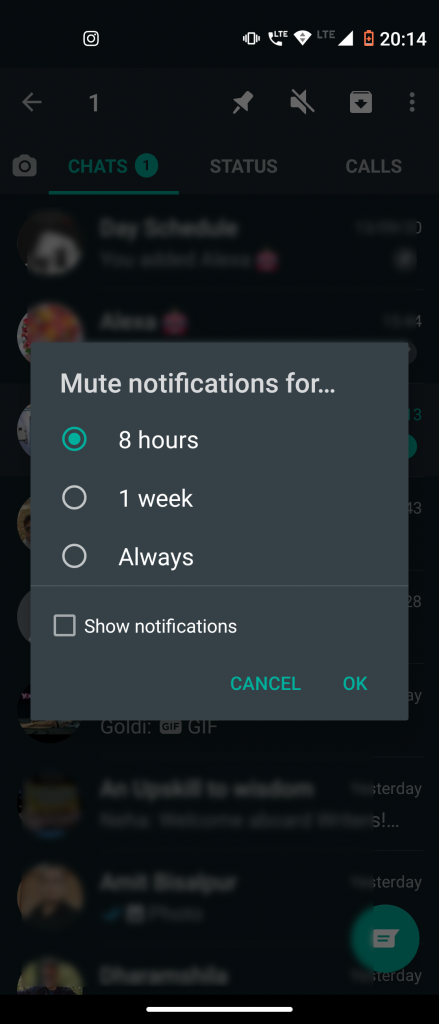
4] Select Always and you are good to go.
Now, the notifications from the particular chat will be muted forever. You can unmute them anytime by tapping and holding on to the chat and then selecting the unmute or speaker icon.
Apart from Always Mute, the new beta version of WhatsApp has also brought some other new features for Android including ‘No Calls for Verified Business’, ‘Media Guidelines’, and ‘New Storage Usage’.

Source: WABetaInfo
The former feature will remove the calls icon from verified businesses. So you will not be able to call a business on WhatsApp anymore. The new storage feature will allow you to manage your storage usage on WhatsApp more effectively.
If you are not on WhatsApp Beta, and still want to see the feature, you can sideload the APK of the latest version from here.
Also, read | How to Stop People From Adding You To WhatsApp Group